Guides

Custom Info

The Info HUD module can be customized to include custom segments using the create_info client-side export.

Basic Usage

The create_info function takes InfoOptions object as an argument, and returns an Info object.

client.lua
local rhud = exports.rhud --- @type rHUDClient
 
local info = rhud:create_info({
  id = 'example_id', -- Unique ID for the info segment
  label = 'Example Label', -- The label displayed at the left of the info segment
  content = 'Hello, World!' -- Content displayed at the right of the info segment (supports HTML)
})

Examples

Basic Example: Server ID

Let's create an info segment that displays the player's server ID.

client.lua
local rhud = exports.rhud --- @type rHUDClient
 
rhud:create_info({
  id = 'server_id',
  label = 'Server ID',
  content = tostring(GetPlayerServerId(PlayerId()))
})

Result of the example

We can also use HTML in the content property to display the server ID in a different color.

client.lua
local rhud = exports.rhud --- @type rHUDClient
 
rhud:create_info({
  id = 'server_id',
  label = 'Server ID',
  content = ('<span style="color: red;">%i</span>'):format(GetPlayerServerId(PlayerId())) 
})

Result of the example


Advanced Example: QBCore Money

We can use QBCore's QBCore:Player:SetPlayerData event to listen for changes in the player's data an update the info segment accordingly, and use a server-side event to request the money data when the resource starts so that restarting the resource doesn't require the player to rejoin the server.

client.lua
local rhud = exports.rhud --- @type rHUDClient
 
local info_cash = rhud:create_info({ id = 'cash', label = 'Cash' })
local info_bank = rhud:create_info({ id = 'bank', label = 'Bank' })
local info_crypto = rhud:create_info({ id = 'crypto', label = 'Crypto' })
 
RegisterNetEvent(UPDATE_EVENT)
AddEventHandler(UPDATE_EVENT, function(money)
  info_cash:update_content(('$%d'):format(money.cash))
  info_bank:update_content(('$%d'):format(money.bank))
  info_crypto:update_content(('$%d'):format(money.crypto))
end)
 
RegisterNetEvent('QBCore:Player:SetPlayerData', function(player)
  if player.money then
    TriggerEvent(UPDATE_EVENT, player.money)
  end
end)
 
TriggerServerEvent(REQUEST_EVENT)
server.lua
local QBCore = exports['qb-core']:GetCoreObject()
 
RegisterNetEvent(REQUEST_EVENT)
AddEventHandler(REQUEST_EVENT, function()
  local source = source
  local player = QBCore.Functions.GetPlayer(source)
 
  if player then
    TriggerClientEvent(UPDATE_EVENT, source, player.PlayerData.money)
  end
end)

The UPDATE_EVENT and REQUEST_EVENT variables are just string constants that you can define to your liking.
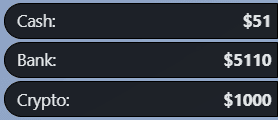
Result of the example


Advanced Example: ESX Money

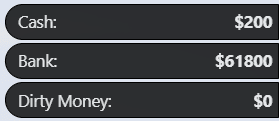
Similarly to QBCore, we can use ESX's esx:setAccountMoney event to listen for changes in the player's money and update the info segment accordingly. We can also use a server-side event to request the money data when the resource starts.

In this example, we are also utilizing the Info object's update_label function.
client.lua
local rhud = exports.rhud --- @type rHUDClient
 
local info_money = rhud:create_info({ id = 'money' })
local info_bank = rhud:create_info({ id = 'bank' })
local info_black_money = rhud:create_info({ id = 'black_money' })
 
RegisterNetEvent(UPDATE_EVENT)
AddEventHandler(UPDATE_EVENT, function(account)
  local info =
      (account.name == 'money' and info_money) or
      (account.name == 'bank' and info_bank) or
      (account.name == 'black_money' and info_black_money)
 
  if not info then return end
 
  info:update_label(account.label)
  info:update_content(('$%d'):format(account.money))
end)
 
RegisterNetEvent('esx:setAccountMoney', function(account)
  TriggerEvent(UPDATE_EVENT, account)
end)
 
TriggerServerEvent(REQUEST_EVENT)
server.lua
local ESX = exports["es_extended"]:getSharedObject()
 
RegisterNetEvent(REQUEST_EVENT)
AddEventHandler(REQUEST_EVENT, function()
  local source = source
  local xPlayer = ESX.GetPlayerFromId(source)
  local accounts = xPlayer.getAccounts()
 
  for _, account in ipairs(accounts) do
    TriggerClientEvent(UPDATE_EVENT, source, account)
  end
end)

Result of the example


Advanced Example: Re-Create Location Info

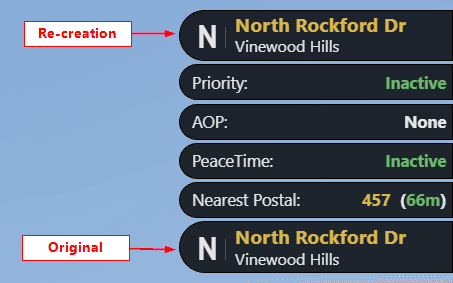
In this example, we will re-create the location info segment by utilizing the style property of the InfoOptions object to add custom CSS styles, and the update_content function of the returned Info object to update the content of the info segment. The wrap property is set to false to prevent the info segment from using its default CSS styles.
client.lua
local rhud = exports.rhud --- @type rHUDClient
 
local compass_points = {
  [0] = 'N',
  [45] = 'NW',
  [90] = 'W',
  [135] = 'SW',
  [180] = 'S',
  [225] = 'SE',
  [270] = 'E',
  [315] = 'NE',
  [360] = 'N'
}
 
Citizen.CreateThread(function()
  local location_template = [[
    <div class="info-location">
      <div class="info-location-point">%s</div>
      <div class="info-location-area">
        <div class="info-location-street">%s</div>
        <div class="info-location-zone">%s</div>
      </div>
    </div>
  ]]
 
  local info_location = rhud:create_info({
    id = 'info_location',
    style = [[
      .info-location {
        display: flex;
        align-items: center;
        justify-content: center;
        line-height: 0.9vh;
        gap: 0.6vh;
        height: 3.315vh;
      }
 
      .info-location .info-location-point {
        font-family: 'Highway Goth';
        font-size: 2.4vh;
        line-height: 1.5vh;
        margin: 0.4vh 0 0 0.4vh;
        padding-right: 0.6vh;
        border-right: 1px solid hsla(0, 0%, 100%, 0.185);
      }
 
      .info-location .info-location-area {
        display: flex;
        flex-direction: column;
        gap: 0.45vh;
      }
 
      .info-location .info-location-area .info-location-street {
        font-weight: bold;
        font-size: 1.35vh;
        line-height: 1.2vh;
        color: hsla(45, 82%, 62%, 0.902);
      }
 
      .info-location .info-location-area .info-location-zone {
        font-size: 1.1vh;
      }
    ]],
    content = location_template:format('N', 'Street Name', 'Zone Name'),
    wrap = false
  })
 
  while true do
    Wait(500)
 
    local ped = GetPlayerPed(-1)
    local pos = GetEntityCoords(ped)
    local heading = GetEntityHeading(ped)
 
    local compass_point = compass_points[math.floor(((heading + 22.5) % 360) / 45) * 45]
    local street_name = GetStreetNameFromHashKey(GetStreetNameAtCoord(pos.x, pos.y, pos.z))
    local zone_name = GetNameOfZone(pos.x, pos.y, pos.z)
    local zone_label = DoesTextLabelExist(zone_name) and GetLabelText(zone_name) or zone_name
 
    info_location:update_content(location_template:format(compass_point, street_name, zone_label))
  end
end)

Result of the example


Footnotes

On this page